ecl-logo Documentation
ECL`

PlotCustomerMetrics

PlotCustomerMetrics[teamFinancing, startDate, endDate]cloudFiles

generates cloudFiles of created notebooks and PDFs that contains consolidated information on different metrics for customer usage of the ECL system between startDate to endDate and updates the teamFinancing to log the generated cloudFiles.

Details

  • The 'startDate' is interpreted as at midnight of "America/Chicago" timezone.
  • The 'endDate' is interpreted as at 11:59:59 pm of "America/Chicago" timezone.
  • The most recent `endDate` that can be included in a report is that of Today - 1 day since a full 24 hours of the day must be covered in any report log.
  • Input
    Output
    General Options

Examples

open allclose all

Example Setup

These expressions are used in the examples to follow:

Basic Examples  (4)

PlotCustomerMetrics generate the notebook and pdf reports and update the team financing object for date range that involve multiple report objects:

PlotCustomerMetrics generate the notebook and pdf reports and update the team financing object for dates that have no protocols completed:

PlotCustomerMetrics generate the notebook and pdf reports and update the team financing object for dates that have protocols completed:

PlotCustomerMetrics generate the notebook and pdf reports and update the team financing objects for multiple financing team inputs:


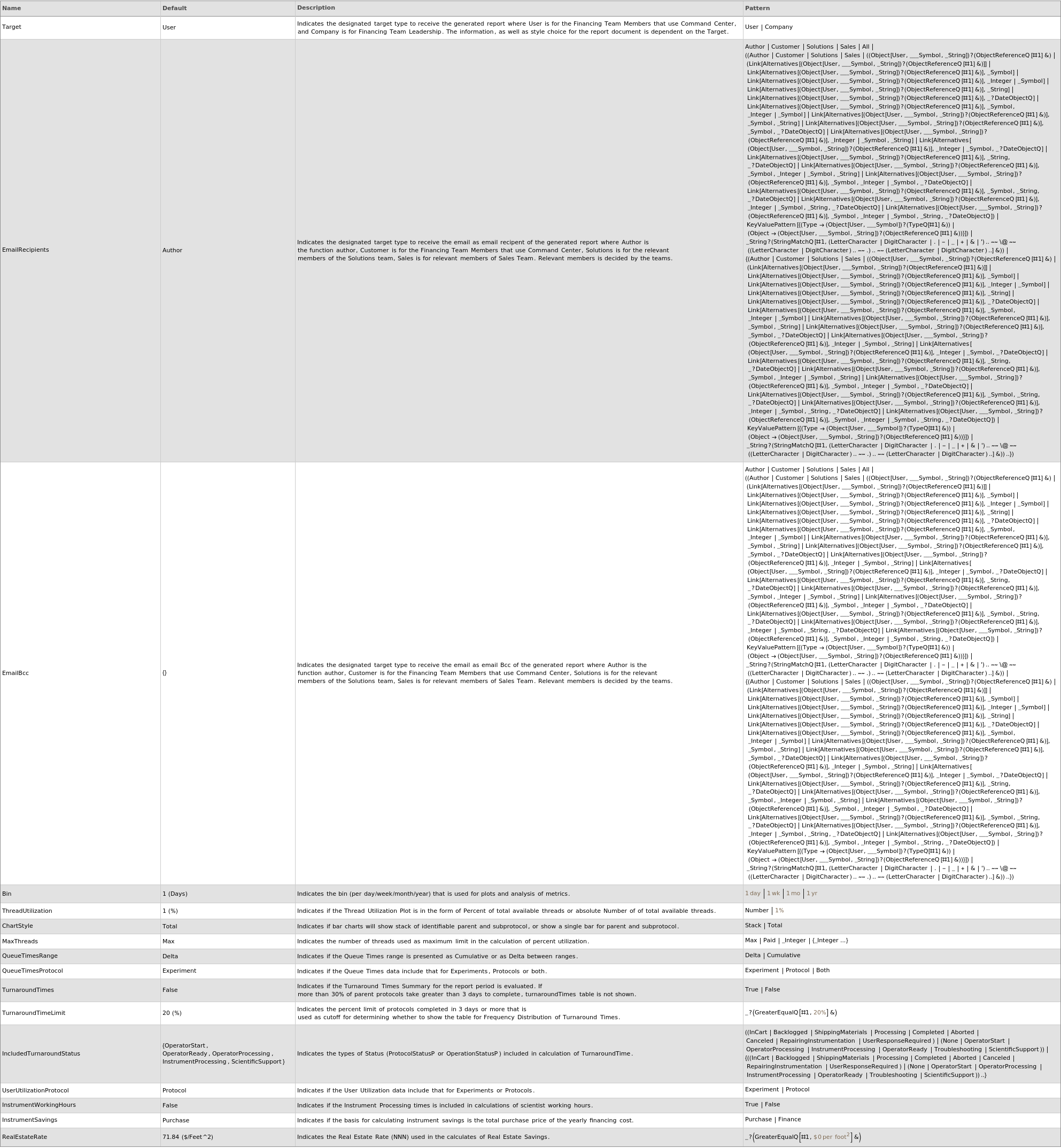
Options  (17)

ChartStyle  (1)

PlotCustomerMetrics generate the notebook and pdf reports and update the team financing object when ChartStyle is specified as Stack:

EmailBcc  (1)

PlotCustomerMetrics generate the notebook and pdf reports and update the team financing object when EmailBcc is specified:

EmailRecipients  (1)

PlotCustomerMetrics generate the notebook and pdf reports and update the team financing object when EmailRecipients is specified:

IncludedTurnaroundStatus  (1)

PlotCustomerMetrics generate the notebook and pdf reports and update the team financing object when IncludedTurnaroundStatus is specified as a list of ProtocolStatusP|OperationStatusP:

InstrumentSavings  (1)

PlotCustomerMetrics generate the notebook and pdf reports and update the team financing object when InstrumentSavings is specified as Finance:

InstrumentWorkingHours  (1)

PlotCustomerMetrics generate the notebook and pdf reports and update the team financing object when InstrumentWorkingHours is specified as True:

MaxThreads  (1)

PlotCustomerMetrics generate the notebook and pdf reports and update the team financing object when MaxThreads is specified as an integer:

QueueTimesProtocol  (1)

PlotCustomerMetrics generate the notebook and pdf reports and update the team financing object when QueueTimesProtocol is specified as Protocol:

QueueTimesRange  (1)

PlotCustomerMetrics generate the notebook and pdf reports and update the team financing object when QueueTimesRange is specified as Cumulative:

RealEstateRate  (1)

PlotCustomerMetrics generate the notebook and pdf reports and update the team financing object when RealEstateRate is specified as a rate in USD/Feet^2:

Target  (1)

PlotCustomerMetrics generate the notebook and pdf reports and update the team financing object when Target is specified as Company:

ThreadUtilization  (1)

PlotCustomerMetrics generate the notebook and pdf reports and update the team financing object when ThreadUtilization is specified as Number:

TurnaroundTimeLimit  (1)

PlotCustomerMetrics generate the notebook and pdf reports and update the team financing object when TurnaroundTimeLimit is specified as an integer:

TurnaroundTimes  (1)

PlotCustomerMetrics generate the notebook and pdf reports and update the team financing object when TurnaroundTimes is specified as True:

Upload  (2)

PlotCustomerMetrics generate the notebook, pdf and financing team object packets for multiple team inputs when Upload is set to False:

PlotCustomerMetrics generate the notebook, pdf and financing team object packet when Upload is set to False:

UserUtilizationProtocol  (1)

PlotCustomerMetrics generate the notebook and pdf reports and update the team financing object when UserUtilizationProtocol is specified as Experiment:

Messages  (2)

MissingReports  (1)

PlotCustomerMetrics returns $Failed when there are missing reports for one or more days included in the date range input:

TooManyDays  (1)

PlotCustomerMetrics returns $Failed when date range is more than 365 days:

Last modified on Thu 18 Sep 2025 17:10:56