
PrintStickers
PrintStickers[object]⟹stickerSheet
generates and prints a barcoded sticker for the specified object.
PrintStickers[object, positions]⟹stickerSheet
generates and prints barcoded sticker(s) for the specified positions within the specified object.
PrintStickers[object, All]⟹stickerSheet
generates and prints barcoded sticker(s) for all positions within the specified object.
If 'positions' is NOT provided: |
| - Prints stickers with the object's ID field encoded in the barcode (e.g. 'id:abcdefghijkl'). |
If 'positions' is provided: |
| - Prints one sticker for each specified position that exists in the specified object. |
| - Prints stickers with individual positions' names appended to the object ID in the barcode (e.g. 'id:abcdefghijkl[Top Shelf Slot]'). |
| - If 'All' is provided as the 'positions' input, destination stickers are printed for all existing positions of the specified objects. |
Input

Output

General Options
Messages
| InputDimensionMismatch | The dimensions of the provided object list do not match the dimensions of the provided position list. | |
| InvalidDestinations | The the requested destinations `1` do not exist in the objects `2`. Please double check which positions or connectors you'd like to print stickers for. | |
| InvalidObjects | The following Objects do not exist in the ECL database: `1`. | |
| NoDestinations | Destination stickers have been requested, but one or more of the input objects do not have any positions or connectors for which destination stickers can be printed. | |
| StickerModelSizeMismatch | The specified StickerSize does not match the size of the specified StickerModel. |
Print a sticker for all containers and items shipped in a transaction:


Print a sticker for a single object:


Print stickers for a list of objects:


If a flat list of positions is specified, it will be repeated to index-match inputs:


If an input-index-matched list of positions is specified, it will be used as-is:


If a singleton position is specified, it will be expanded to index-match inputs:

Print a sticker for a plumbing connector:


Print destination stickers for all positions in input:


Print stickers for a list of raw IDs:

Print stickers for a single raw ID:


Specify the particular position names for which Destination stickers should be printed:


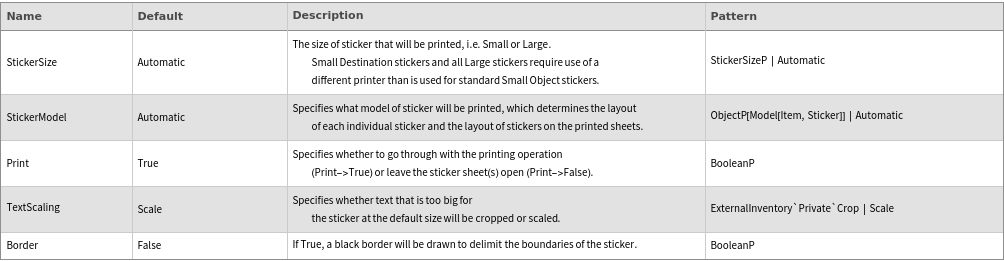
Specify whether the border delineating the edge of the sticker graphic's area should be drawn:

Specify that sticker sheets should be returned rather than printed using the Print option:
Specify the particular Model[Item,Sticker] on which stickers should be printed:

Specify the size of sticker to be used:


Switch between Cropping and Scaling of description text that is too long to fit on the specified stickers:


Specifying a Positions input that does not index-match sticker input will produce an error:



Specifying a Position that does not exist in the given input object will produce an error:


Invalid SLL Object(s) passed into the function will produce an error:


Attempting to print Destination stickers for an item that is not a Container or Instrument will produce an error:


Specifying a StickerSize that does not match the size of the specified StickerModel will produce an error:


ReportInventory GenerateAutomaticOrders