
TemporalLinkP
TemporalLinkP[]⟹pattern
returns a pattern which matches a link to any object from a historical point in time (aka a temporal link).
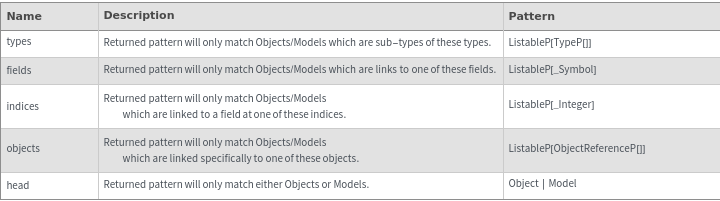
TemporalLinkP[types]⟹pattern
returns a pattern which matches a temporal link to any object of the given types.
TemporalLinkP[types,fields]⟹pattern
returns a pattern which matches temporal link to any historical object of the given fields in the given types.
TemporalLinkP[types,fields,indices]⟹pattern
returns a pattern which matches a temporal link to any object of the given fields in the given types at the specific indices.
TemporalLinkP[objects]⟹pattern
returns a pattern which matches a temporal link to any of the specified objects.
TemporalLinkP[head]⟹pattern
returns a pattern which matches a temporal link to any object with the given head.
Details
Input
Output

Examples
Basic Examples (4)
Temporal Links are an extension to Links and represent an Object at a specific point in time. Temporal Links share the same structure as links with a date appended:


By default, LinkP[] does not accept Temporal Links:


The Temporal option on LinkP[] allows the pattern to include Temporal Links:

TemporalLinkP[] matches on Temporal Links, but does not match on Regular Links:


Additional Examples (20)
Downloading a Temporal Link is equivalent to Downloading the object at the time specified by the link:


Downloading Through a Temporal Link gets Values from Historical Version of the Object:


If a back link field is defined as Temporal, then the backlink is a temporal link that points back to the object at the time at which the backlink was created:


Inspecting a Temporal Link shows the historical version of that object:

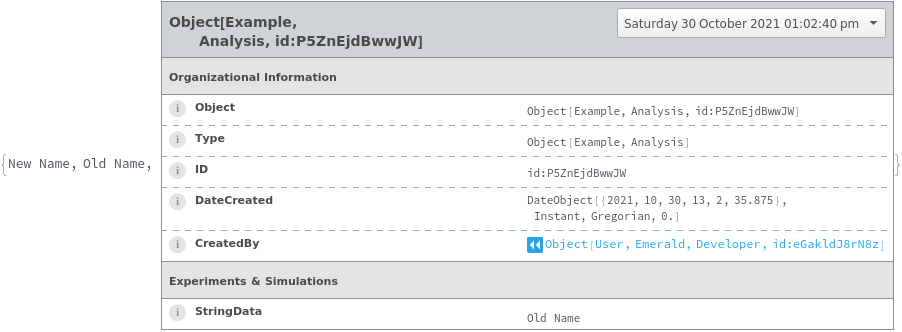
You can search through Temporal Links for historical data:


Temporal Links and Links can be chained together in a Search. Dates can also be provided to search on previous temporal links within Constellation:


Temporal Links and Links can be chained together in a Download:

Match a new link to a specific field:


Match an existing one-way link with a link ID:

Restrict the match to a specific object ID:

Match any existing Link to an indexed field with a link-id:

Match a link to only model objects:







