ecl-logo Documentation

UploadInventory

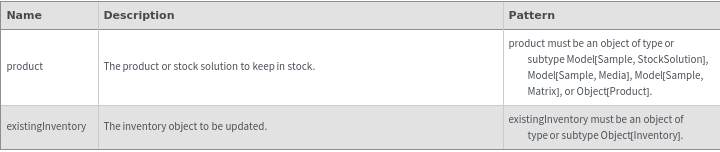
UploadInventory[product]inventory

returns an inventory object specifying how to keep the specified product in stock.

UploadInventory[existingInventory]inventory

returns the inventory object updated according to the specified options.

Details

    Input
    Output

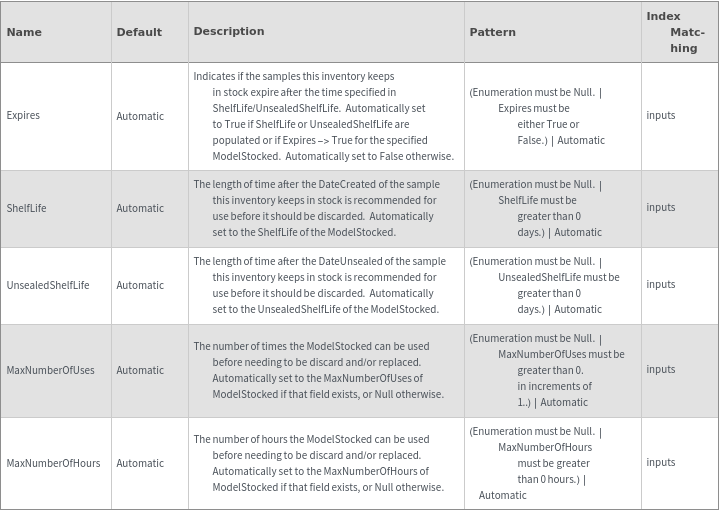
    Expiration Options
    Organizational Information Options

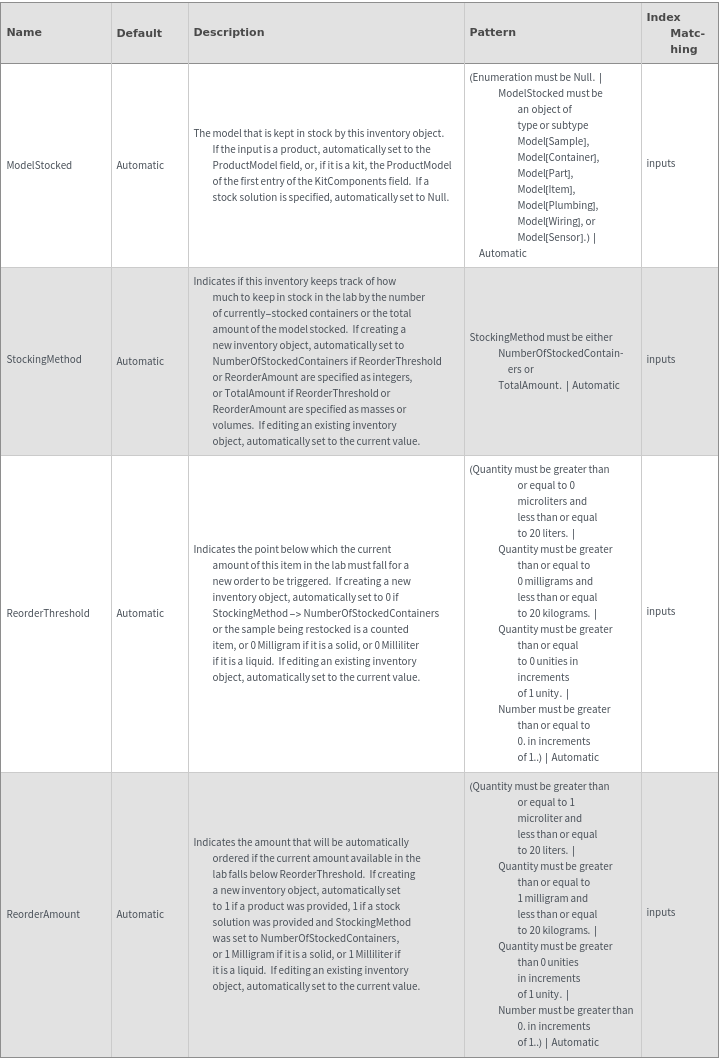
    Restocking Options
    General Options
Examples

Basic Examples  (5)

Create an Inventory object for the automatic reordering of a kit product:

Create an Inventory object for the automatic reordering of a non-kit product:

Create an Inventory object for the automatic reordering of a stock solution:

Edit the values of an already-existing inventory object:

Edit the values of an already-existing inventory stock solution:

Additional Examples  (1)

Create multiple different new Inventory objects at once:

Options  (23)

Expires  (2)

Specify whether the samples that are received in the course of automatic reordering have their Expires field set to True:

If left unspecified, automatically set to True if the model being ordered has Expired set to True, or if ShelfLife or UnsealedShelfLife are populated:

MaxNumberOfHours  (2)

Use the MaxNumberOfHours option to specify how many long the sample being kept in stock can be usLed before it needs to be replaced:

If left unspecified, automatically set to the MaxNumberOfUses field of the model being stocked, or Null if those do not exist:

MaxNumberOfUses  (2)

Use the MaxNumberOfUses option to specify how many times the sample being kept in stock can be used before it needs to be replaced:

If left unspecified, automatically set to the MaxNumberOfUses field of the model being stocked, or Null if those do not exist:

ModelStocked  (3)

Specify the model to be kept in stock by this inventory object:

Automatically set to the ProductModel field, or the first entry in the KitComponents:

Change the ModelStocked to the specified value if operating on an existing inventory object, or resolve to the existing value if left Automatic:

Name  (1)

Specify the name of the Inventory objects that are created:

ReorderAmount  (2)

Use the ReorderAmount to indicate the amount that is reordered when the amount of sample falls below ReorderThreshold:

If left unspecified, automatically set to 1 with the appropriate units, or the TotalVolume of the stock solution if StockingMethod resolves to TotalAmount:

ReorderThreshold  (2)

Use the ReorderThreshold to indicate the value below which the sample being kept in stock is reordered:

If left unspecified, automatically set to zero with the appropriate units:

ShelfLife  (2)

Use the ShelfLife to indicate the length of time after automatically-restocked samples have been received at ECL that they are considered to have expired:

If left unspecified, automatically set to the value in the model's ShelfLife field:

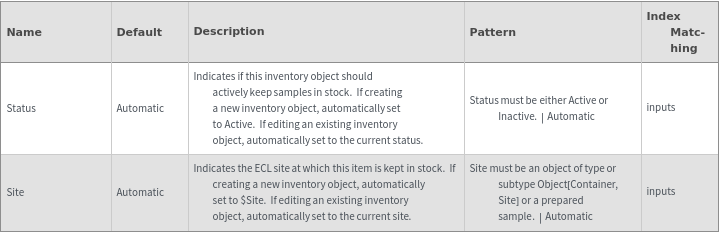
Site  (1)

Set the site at which this inventory should keep samples in stock; automatically set to $Site if not specified:

Status  (2)

Set the status of the existing inventory; if unspecified, automatically set to the status to the current status:

Set the status of a newly-created inventory; Automatically set to Active:

StockingMethod  (2)

Use the StockingMethod option to specify whether to measure how much is in stock by the total volume or number of unopened containers/items in the lab:


If not specified, StockingMethod is automatically set to TotalAmount if ReorderThreshold or ReorderAmount is set to a mass or amount, or NumberOfStockedContainers if ReorderThreshold or ReorderAmount are set to integers:


UnsealedShelfLife  (2)

Use the UnsealedShelfLife to indicate the length of time after automatically-restocked samples have been received at ECL that they are considered to have expired:

If left unspecified, automatically set to the value in the model's UnsealedShelfLife field:

Messages  (14)

DeprecatedProducts  (1)

Cannot create inventories for Deprecated products:

ExpirationDateMismatch  (2)

If Expires is set to True, then either ShelfLife or UnsealedShelfLife must be resolved to a time:

If Expires is set to False, then ShelfLife and UnsealedShelfLife cannot be specified:

InventoryNameExists  (2)

Throw an error if trying to set the name of an inventory object to one that already exists:

Note that this still happens if trying to rename the object to its own name:

MaxNumberOfHoursInvalid  (1)

MaxNumberOfHours can only be specified for objects that have the MaxNumberOfHours fields:

MaxNumberOfUsesInvalid  (1)

MaxNumberOfUses can only be specified for objects that have the MaxNumberOfUses fields:

ModelStockedNotAllowed  (2)

If creating a new inventory for a product, the ModelStocked must be supplied by the specified product:

If editing an existing inventory for a product, the ModelStocked must be supplied by the specified product:

ModelStockedNotNullInvalid  (2)

If editing an inventory for a stock solution, ModelStocked must be Null:

If creating an inventory for a stock solution, ModelStocked must be Null:

ReorderStateMismatch  (1)

ReorderThreshold and ReorderAmount must be compatible with the state of the samples:

StockingMethodInvalid  (2)

If StockingMethod is set to NumberOfStockedContainers, ReorderThreshold and ReorderAmount must be set to integer values:

If StockingMethod is set to TotalAmount for an Object[Product] object, ReorderAmount must still be an integer value: