
ecl-logo Documentation

UploadProduct

UploadProduct[myThermoFisherURL]productObject

returns an object productObject that contains the information given about the product from the ThermoFisher product URL.

UploadProduct[myMilliporeSigmaURL]productObject

returns an object productObject that contains the information given about the product from the MilliporeSigma product URL.

UploadProduct[myFisherScientificURL]productObject

returns an object productObject that contains the information given about the product from the Fisher Scientific product URL.

UploadProduct[]productObject

returns an object productObject that contains the information given about the product.

Details

    Input

    Output

    Inventory Options

    Organizational Information Options

    Pricing Information Options

    Product Specification Options

    Product Specifications Options
Examples

Basic Examples  (3)

Upload a new Object[Product] of Methanol, anhydrous, 99.8% purity using its Sigma-Aldrich product URL:


Upload a new Object[Product] of DMSO (LC-MS Grade) using its ThermoFisher product URL:

Upload a new Object[Product] of Diethylene glycol methyl ether manually (without scraping from a product URL) :


Options  (23)

Amount  (1)

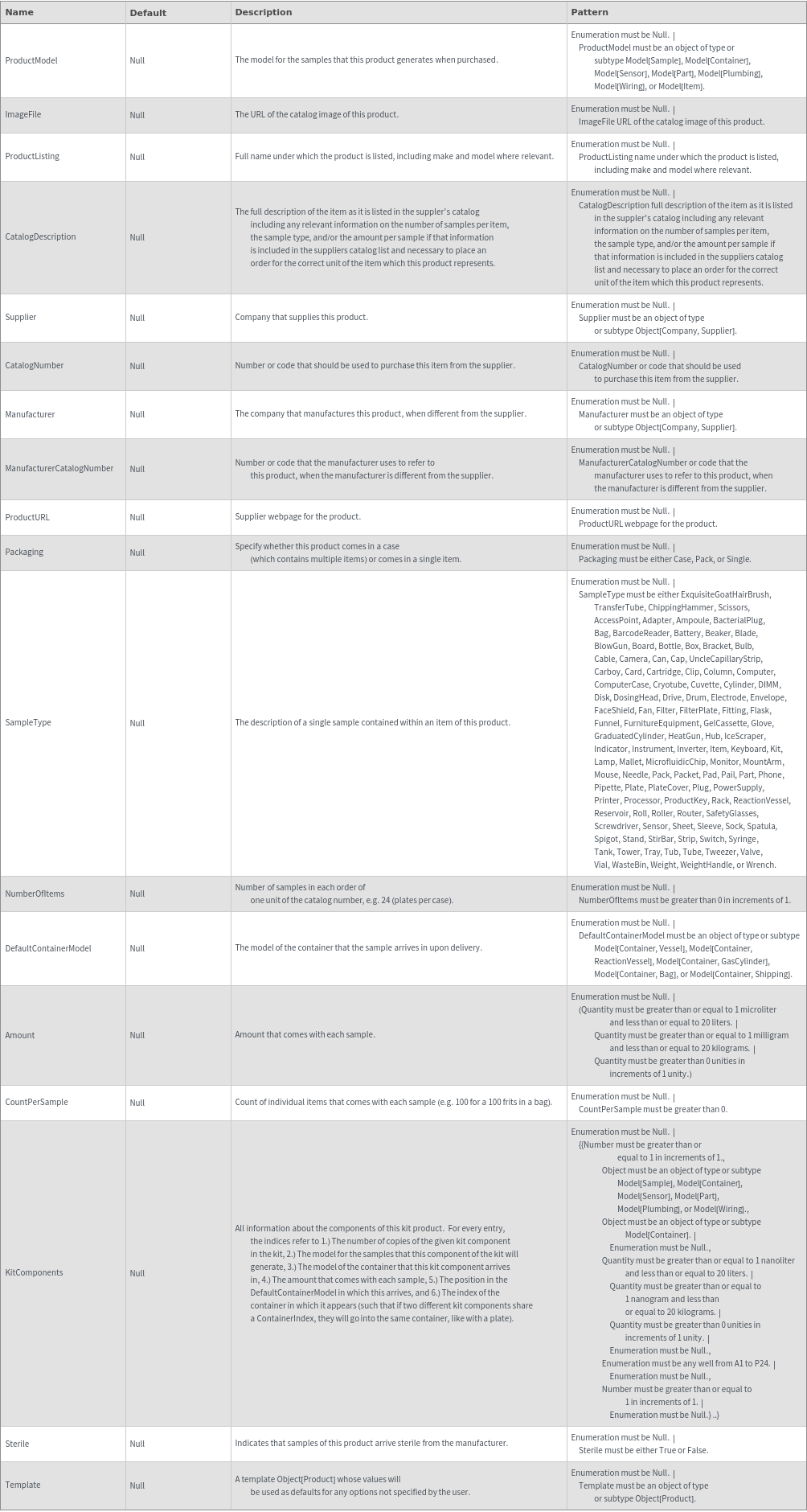
Use the Amount option to specify amount of substance per sample. For example, if the product contained 100 mL, then Amount ->100 * Milliliter:

CatalogDescription  (1)

Use the CatalogDescription option to specify the full description of the item as it is listed in the supplier's catalog including any relevant information on the number of samples per item, the sample type, and/or the amount per sample if that information is included in the suppliers catalog list and necessary to place an order for the correct unit of the item which this product represents:


CatalogNumber  (1)

Use the CatalogNumber option to specify the catalog number, as given by the supplier, of this product:

CountPerSample  (1)

Use the CountPerSample option to specify the count of individual items that comes with each sample. For example, if a product was a bag of 100 tubes, then CountPerSample->100. This option should not be specified with Amount:

DefaultContainerModel  (1)

Use the DefaultContainerModel option to specify the container that the product arrives in from the manufacturer:

Density  (1)

Use Density to specify Density of the Product:

ImageFile  (1)

Use the ImageFile option to specify an image of the product of the uploaded Object[Product]. This should be a URL of an image file:

KitComponents  (1)

Use the KitComponents option to specify all the components of the given kit:

Manufacturer  (1)

Use the Manufacturer option to specify the Object[Company,Supplier] that manufactured this product:

ManufacturerCatalogNumber  (1)

Use the ManufacturerCatalogNumber to specify the Manufacturer's catalog number for this product:

Name  (1)

Use the Name option to specify the name of the uploaded Object[Product]:

NumberOfItems  (1)

Use the NumberOfItems option to specify the number of samples in each order of one unit of this product. If this product is an item, NumberOfItems->1. If it is a Case, NumberOfItems should be the number of items in the case:

Packaging  (1)

Use the Packaging to specify if this product is a Case or an Item:

Price  (1)

Use the Price option to specify the price for one unit of this product:

ProductListing  (1)

Use the ProductListing option to specify the full name under which the product is listed:

ProductModel  (1)

Use the ProductModel option to specify the model of the uploaded Object[Product]. This field can be a Model[Sample], Model[Container], Model[Sensor], Model[Part], Model[Plumbing], or Model[Wiring]:

ProductURL  (1)

Use the ProductURL to specify the Product URL of this product:

SampleType  (1)

Use the SampleType to specify the type of sample that this product is. The valid values of this option can be found by evaluating SampleDescriptionP:

ShippedClean  (1)

Use the ShippedClean option to specify that samples of this product arrive ready to be used without needing to be dishwashed:

Sterile  (1)

Use the Sterile option to specify that samples of this product arrive sterile from the manufacturer:

Supplier  (1)

Use the Supplier option to specify the company that supplies this product. All Object[Company,Supplier] objects can be found by performing a search (Search[Object[Company,Supplier]]):

Synonyms  (1)

Use the Synonyms option to specify the synonyms of the uploaded Object[Product]:

Template  (1)

Use the Template option to provide an Object[Product] from which default values will be taken:

Messages  (14)

AmountUnitState  (1)

The option Amount must match the model's state of matter. In the following example, the ProductModel of Methanol has State->Liquid. Therefore, Amount cannot be set to 3 Gram:

EmeraldSuppliedProductSamples  (1)

If Emerald Cloud Lab is the supplier of this product, NumberOfItems must be 1. In the following example, the ECL is set as the supplier of the product, but NumberOfItems is set to 2:

InvalidContainerIndexPosition  (1)

If KitComponents is specified, ContainerIndex and Position must not be Null for NonSelfContainedSampleModels (and must be Null for all others):

InvalidKitOptions  (1)

If KitComponents is specified, ProductModel, DefaultContainerModel, NumberOfItems, CountPerSample, and Amount must all be Null:

InvalidSampleType  (1)

If KitComponents is specified, SampleType must be Kit:

ManufacturerOptions  (1)

The options Manufacturer and ManufacturerCatalogNumber must either both be specified or both set to Null. In the following example, ManufacturerCatalogNumber is set but Manufacturer is set to Null:

NameIsPartOfSynonyms  (1)

The Name of the object must be part of its list of Synonyms. In the following example, the name of the product is not part of the synonyms list:

NonUniqueName  (1)

An Object[Product] cannot be uploaded if another Object[Product] already exists in Constellation with the same name. In the following example, there is already a product in the database with the name "Methanol, anhydrous, 99.8%":

PricePerUnitRequired  (1)

If this product is not supplied by Emerald Cloud Lab, the Price option must be specified. In the following example, the column is not provided by the ECL so Price must be specified:

ProductAmount  (1)

If this product is self contained, Amount must not be specified. If this product is not self contained, Amount must be specified. In the following example, the product is not self contained but Amount is set to Null.

RepeatedContainerIndex  (1)

If KitComponents is specified, all components whose Containers are specified as Model[Container,Vessel] must have unique container indices:

RequiredOptions  (1)

An Object[Product] cannot be uploaded without certain key information. If a key field is set to Null, an error will be thrown. In the following example, Name is set to Null:

SingleKitComponent  (1)

If KitComponents is specified, at least two components must be specified:

TabletFields  (1)

The options Amount and CountPerSample cannot both be informed at the same time, unless the product model is a Model[Sample] that is a Tablet. In the following example, CountPerSample is set to 1 and Amount were automatically populated by the Sigma Aldrich website:
















































































