ValidAnalyzeBindingQuantitationQ
ValidAnalyzeBindingQuantitationQ[QuantitationData]⟹TestSummary
returns an EmeraldTestSummary which contains the test results of AnalyzeBindingQuantitation[QuantitationData] for all the gathered tests/warnings or a single Boolean indicating validity.
ValidAnalyzeBindingQuantitationQ[DataObject]⟹TestSummary
returns an EmeraldTestSummary which contains the test results of AnalyzeBindingQuantitation[DataObject] for all the gathered tests/warnings or a single Boolean indicating validity.
ValidAnalyzeBindingQuantitationQ[ProtocolObject]⟹TestSummary
returns an EmeraldTestSummary which contains the test results of AnalyzeBindingQuantitation[ProtocolObject] for all the gathered tests/warnings or a single Boolean indicating validity.
Details
Input

Output

Data Processing Options
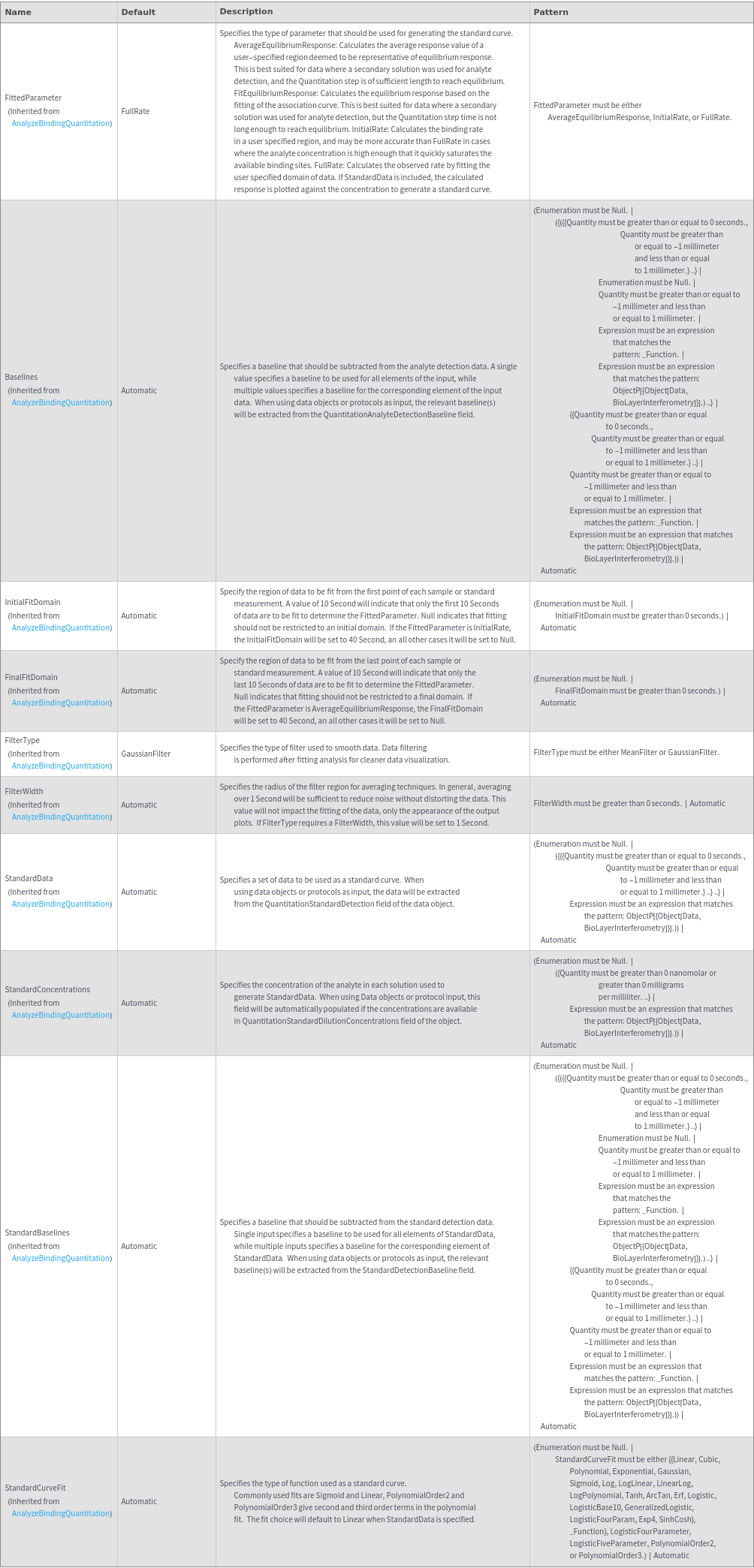
General Options

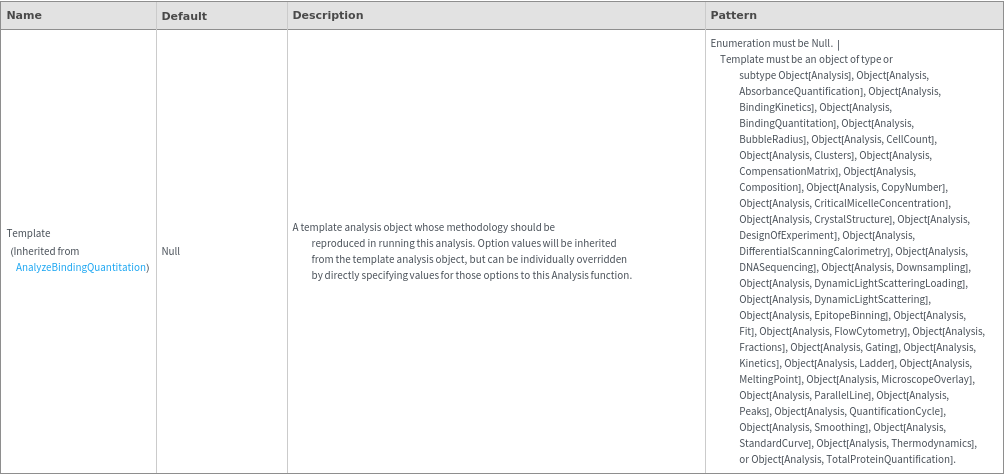
Method Options
Examples
Basic Examples (4)
Given an Object[Data,BioLayerInterferometry] with a standard, calculate the concentration of the input sample:
Given an Object[Data,BioLayerInterferometry] with a standard, ValidAnalyzeBindingQuantitationQ return True:
Given an Object[Protocol,BioLayerInterferometry], ValidAnalyzeBindingQuantitationQ returns True:
Given multiple Object[Data,BioLayerInterferometry] with standards, ValidAnalyzeBindingQuantitationQ True:
Additional Examples (1)
ValidAnalyzeBindingQuantitationQ populates the QuantitationAnalysis field with a data object containing the relevant fields:
Options (17)
Baselines (3)
Automatically populate the baseline if the data object contains QuantitationAnalyteBaselines:
Specify a constant baseline for each input data object:
Specify a single constant baseline to apply to all data objects:
FilterType (1)
Specify the type of filter to use to filter data for output plots:
FilterWidth (1)
Specify the radius of data points to treat with the filter type:
FinalFitDomain (2)
Automatically resolve the final domain based on the FittedParameter:
Specify the final domain to fit for all samples and standards:
FittedParameter (1)
Specify the parameter that should be fit to generate the standard curve:
InitialFitDomain (2)
Automatically resolve the final domain based on the FittedParameter:
Specify the initial domain to fit for all samples and standards:
StandardBaselines (2)
Automatically resolve the baselines to fit for the standard data based on the presence of the standard data:
Specify the baselines for the standard data:
StandardConcentrations (2)
Automatically resolve the concentrations of the dilutions used in StandardData when using data object input:
Specify the concentrations of the dilutions used in StandardData:
StandardCurveFit (1)
Specify a function to generate a standard curve:
StandardData (2)
Automatically populate the standard curve data if the data object contains QuantitationStandardDetection:
Specify data objects with QuantitationStandardDetection which is appropriate for the sample:
Messages (8)
Given an Object[Data,BioLayerInterferometry] without a standard, ValidAnalyzeBindingQuantitationQ returns False:
Baselines (2)
If an ambiguous number of baselines are given, an error is thrown:
When a data baseline is provided that is too short to span the data, an error is thrown:
Domains (1)
When both Final and InitialFitDomain are specified, an error is shown:
FinalFitDomain (1)
When the InitialFitDomain is inconsistent with the the Fitted Parameter, a warning is displayed:
Fit (2)
When no standard data can be found an error is thrown:
When parameters are specified such that the data cannot be fit, a message will inform the user that the fitting will fail:
InitialFitDomain (1)
When the InitialFitDomain is inconsistent with the the Fitted Parameter, a warning is displayed:
Last modified on Mon 14 Nov 2022 19:02:44





























