
ecl-logo Documentation
ECL`

UploadCountLiquidParticlesMethod

UploadCountLiquidParticlesMethod[Samples]CapillaryELISACartridgeModel

creates a new pre-loaded CapillaryELISACartridgeModel with the specified analytes, cartridge type and species.

Details

    Input

    Output

    Particle Size Measurements Options
    Sample Preparation Options
    Washing Options

    General Options

Examples

open allclose all

Example Setup

These expressions are used in the examples to follow:

Basic Examples  (1)

Upload new method for ExperimentCountLiquidParticles:

Options  (37)

AcquisitionMix  (1)

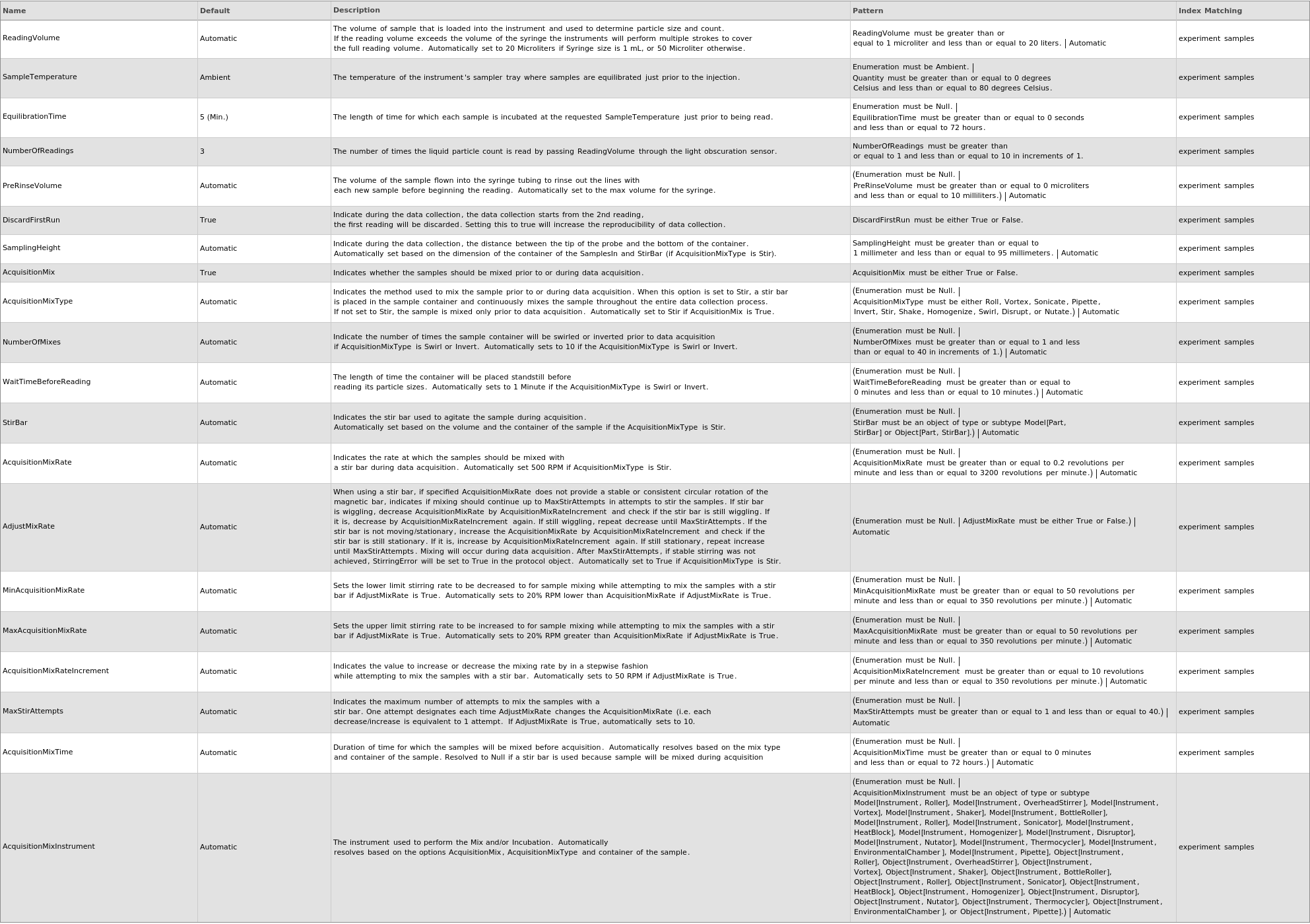
Specify indicates whether the samples should be mixed with a stir bar during data acquisition:

AcquisitionMixRate  (1)

Specify indicates the rate at which the samples should be mixed with a stir bar during data acquisition:

AcquisitionMixRateIncrement  (1)

Specify indicates the value to increase or decrease the mixing rate by in a stepwise fashion while attempting to mix the samples with a stir bar:

AcquisitionMixType  (1)

Specify the mix type:

AdjustMixRate  (1)

Specify When using a stir bar, if specified AcquisitionMixRate does not provide a stable or consistent circular rotation of the magnetic bar, indicates if mixing should continue up to MaxStirAttempts in attempts to stir the samples. If stir bar is wiggling, decrease AcquisitionMixRate by AcquisitionMixRateIncrement and check if the stir bar is still wiggling. If it is, decrease by AcquisitionMixRateIncrement again. If still wiggling, repeat decrease until MaxStirAttempts. If the stir bar is not moving/stationary, increase the AcquisitionMixRate by AcquisitionMixRateIncrement and check if the stir bar is still stationary. If it is, increase by AcquisitionMixRateIncrement again. If still stationary, repeat increase until MaxStirAttempts. Mixing will occur during data acquisition. After MaxStirAttempts, if stable stirring was not achieved, StirringError will be set to True in the methods object:

Cache  (1)

Specify list of pre-downloaded packets to be used before checking for session cached object or downloading any object information from the server:

Diluent  (1)

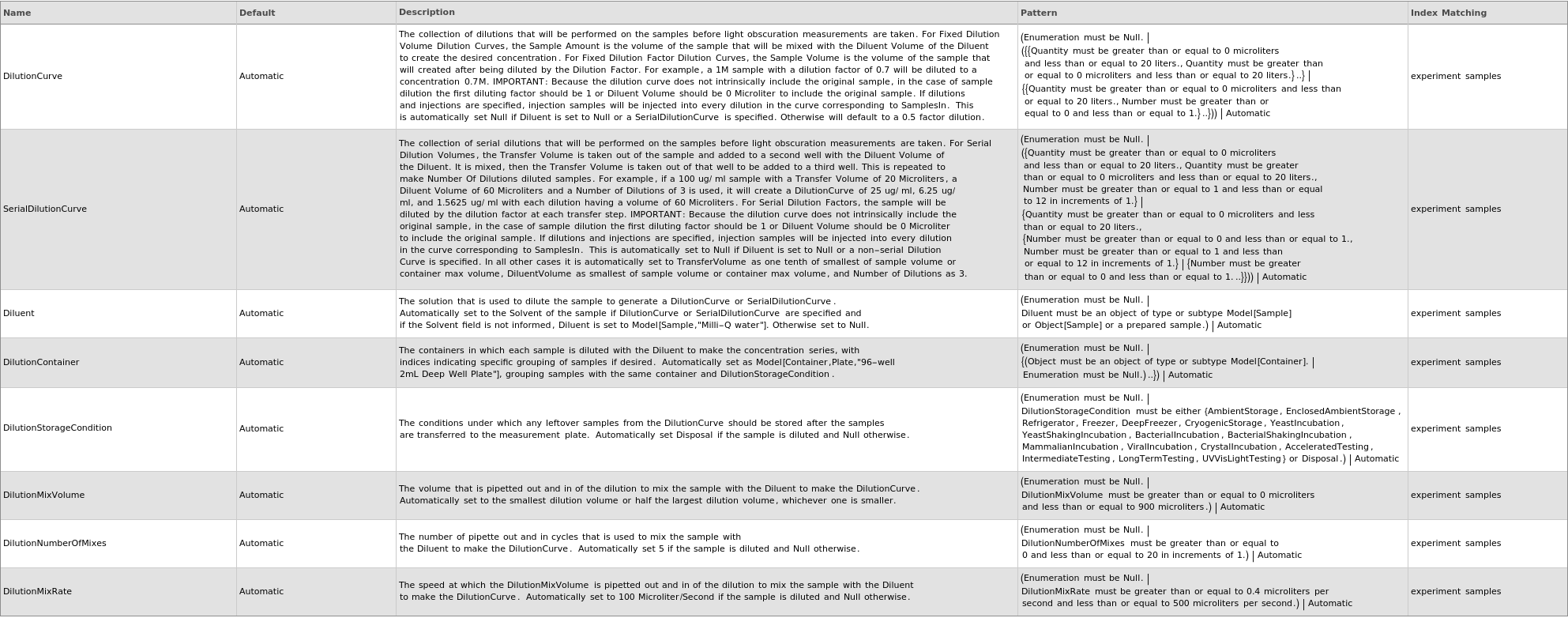
Specify the solution that is used to dilute the sample to generate a DilutionCurve or SerialDilutionCurve:

DilutionContainer  (1)

Specify the containers in which each sample is diluted with the Diluent to make the concentration series, with indices indicating specific grouping of samples if desired:

DilutionCurve  (1)

Specify the collection of dilutions that will be performed on the samples before light obscuration measurements are taken. For Fixed Dilution Volume Dilution Curves, the Sample Amount is the volume of the sample that will be mixed with the Diluent Volume of the Diluent to create the desired concentration. For Fixed Dilution Factor Dilution Curves, the Sample Volume is the volume of the sample that will created after being diluted by the Dilution Factor. For example, a 1M sample with a dilution factor of 0.7 will be diluted to a concentration 0.7M. IMPORTANT: Because the dilution curve does not intrinsically include the original sample, in the case of sample dilution the first diluting factor should be 1 or Diluent Volume should be 0 Microliter to include the original sample. If dilutions and injections are specified, injection samples will be injected into every dilution in the curve corresponding to SamplesIn:

DilutionMixRate  (1)

Specify the speed at which the DilutionMixVolume is pipetted out and in of the dilution to mix the sample with the Diluent to make the DilutionCurve:

DilutionMixVolume  (1)

Specify the volume that is pipetted out and in of the dilution to mix the sample with the Diluent to make the DilutionCurve:

DilutionNumberOfMixes  (1)

Specify the number of pipette out and in cycles that is used to mix the sample with the Diluent to make the DilutionCurve:

DilutionStorageCondition  (1)

Specify the conditions under which any leftover samples from the DilutionCurve should be stored after the samples are transferred to the measurement plate:

DiscardFirstRun  (1)

Specify indicate during the data collection, the data collection starts from the 2nd reading, the first reading will be discarded. Setting this to true will increase the reproducibility of data collection:

EquilibrationTime  (1)

Specify the length of time for which each sample is incubated at the requested SampleTemperature just prior to being read:

MaxAcquisitionMixRate  (1)

Specify Sets the upper limit stirring rate to be increased to for sample mixing while attempting to mix the samples with a stir bar if AdjustMixRate is True:

MaxStirAttempts  (1)

Specify indicates the maximum number of attempts to mix the samples with a stir bar. One attempt designates each time AdjustMixRate changes the AcquisitionMixRate (i.e. each decrease/increase is equivalent to 1 attempt:

MinAcquisitionMixRate  (1)

Specify Sets the lower limit stirring rate to be decreased to for sample mixing while attempting to mix the samples with a stir bar if AdjustMixRate is True:

Name  (1)

Specify for each member SamplesIn, the name of the method that will be uploaded:

NumberOfReading  (1)

Specify the number of times the liquid particle count is read by passing ReadingVolume through the light obscuration sensor:

NumberOfWash  (1)

Specify for each member SamplesIn, the number of times each wash solution is pumped through the instrument's flow path:

Output  (1)

Specify indicate what the function should return:

ParticleSizes  (1)

Specify the collection of ranges (5 Micrometer to 100 Micromter) the different particle sizes that monitored:

PreRinseVolume  (1)

Specify the volume of the sample flown into the syringe tubing to rinse out the lines with each new sample before beginning the reading:

ReadingVolume  (1)

Specify the volume of sample that is loaded into the instrument and used to determine particle size and count. If the reading volume exceeds the volume of the syringe the instruments will perform multiple strokes to cover the full reading volume:

SampleTemperature  (1)

Specify the temperature of the instrument's sampler tray where samples are equilibrated just prior to the injection:

SamplingHeight  (1)

Specify the height of the probe during data collection:

SerialDilutionCurve  (1)

Specify the collection of serial dilutions that will be performed on the samples before light obscuration measurements are taken. For Serial Dilution Volumes, the Transfer Volume is taken out of the sample and added to a second well with the Diluent Volume of the Diluent. It is mixed, then the Transfer Volume is taken out of that well to be added to a third well. This is repeated to make Number Of Dilutions diluted samples. For example, if a 100 ug/ ml sample with a Transfer Volume of 20 Microliters, a Diluent Volume of 60 Microliters and a Number of Dilutions of 3 is used, it will create a DilutionCurve of 25 ug/ ml, 6.25 ug/ ml, and 1.5625 ug/ ml with each dilution having a volume of 60 Microliters. For Serial Dilution Factors, the sample will be diluted by the dilution factor at each transfer step. IMPORTANT: Because the dilution curve does not intrinsically include the original sample, in the case of sample dilution the first diluting factor should be 1 or Diluent Volume should be 0 Microliter to include the original sample. If dilutions and injections are specified, injection samples will be injected into every dilution in the curve corresponding to SamplesIn:

Simulation  (1)

Specify the Simulation that contains any simulated objects that should be used:

StirBar  (1)

Specify indicates the stir bar used to agitate the sample during acquisition:

Syringe  (1)

Specify the syringe installed on the instrument sampler used to draw the liquid through the light obscuration sensor and out of the system:

SyringeSize  (1)

Specify the size of the syringe installed on the instrument sampler used to draw the liquid through the light obscuration sensor and flush it back out:

Upload  (1)

Specify indicates if the database changes resulting from this function should be made immediately or if upload packets should be returned:

WashEquilibrationTime  (1)

Specify for each member of SamplesIn, the length of time for which the wash solution container equilibrate at the requested WashSolutionTemperature in the sample rack before being pumped through the instrument's flow path:

WashSolution  (1)

Specify for each member of SamplesIn, the solution pumped through the instrument's flow path to clean it between the loading of each new sample:

WashSolutionTemperature  (1)

Specify for each member of SamplesIn, the temperature to which the WashSolution is preheated before flowing it through the flow path:

WashWaitTime  (1)

Specify for each member of SamplesIn, the amount of time for which the syringe is allowed to soak with each wash solution before flushing it to the waste:

Last modified on Sat 24 Jan 2026 18:08:54